The Security Paradox of "Confidential" Documents
Founders, CFOs, corporate legal teams, and architects encounter this scenario every week:
You have spent months preparing an unreleased investor pitch deck, a confidential M&A due-diligence report, or an unannounced product specification. Before sharing the PDF with external parties or potential partners, you want to ensure it is visually marked to deter unauthorized redistribution:
To achieve this quickly, an employee searches Google for "free PDF watermark tool", navigates to the first sponsored search result, and drags the file into a browser window.
The irony is glaring: In an attempt to prevent unauthorized leaks, the confidential trade secrets were just uploaded to an unverified third-party cloud server before the intended recipient ever opened the document.
What Actually Happens When You Watermark PDFs Online?
Most web-based PDF utility sites market themselves as "free and easy," but the underlying infrastructure introduces severe liabilities for businesses:
- Uncontrolled Remote Retention: Web servers frequently store uploaded documents in temporary storage buckets or log directories for caching, debugging, or batch queues. Even if privacy policies promise "deletion after 1 hour," your file resides on an external machine outside your enterprise security perimeter.
- Third-Party Model Training: Several free online document tools reserve rights in their terms of service to analyze document text or utilize uploaded assets to train AI models and OCR parsers.
- Regulatory & NDA Violations: Under GDPR, HIPAA, and corporate Non-Disclosure Agreements, transmitting personal data or proprietary business intelligence to unvetted cloud processors constitutes an unauthorized disclosure.
Why Strategic Watermarking Protects Intellectual Property
Visual watermarks remain one of the most effective psychological and legal deterrents against document leaks when implemented correctly:
- Dissuading Casual Screenshots: While technical users can sometimes strip text streams, a semi-transparent diagonal watermark across diagrams, tables, and financial charts makes leaked screenshots unusable for publishing or social media.
- Recipient-Specific Tracking: By stamping the recipient's organization name or email (e.g., "Prepared exclusively for Venture Capital Firm A"), you establish immediate accountability. If the deck surfaces elsewhere, the source of the leak is obvious.
- Differentiating Drafts from Executed Contracts: Stamping "DRAFT - FOR INTERNAL REVIEW" across preliminary agreements prevents parties from mistakenly signing outdated or unauthorized document versions.
Step-by-Step: How to Watermark PDFs Offline with Docentra
Docentra PDF Suite was engineered around a strict Offline-Native philosophy. Every watermark calculation, opacity blend, and font rendering occurs entirely inside your Windows PC's CPU and RAM. No data ever leaves your device.
Step 1: Launch Docentra and Open Watermark Tool
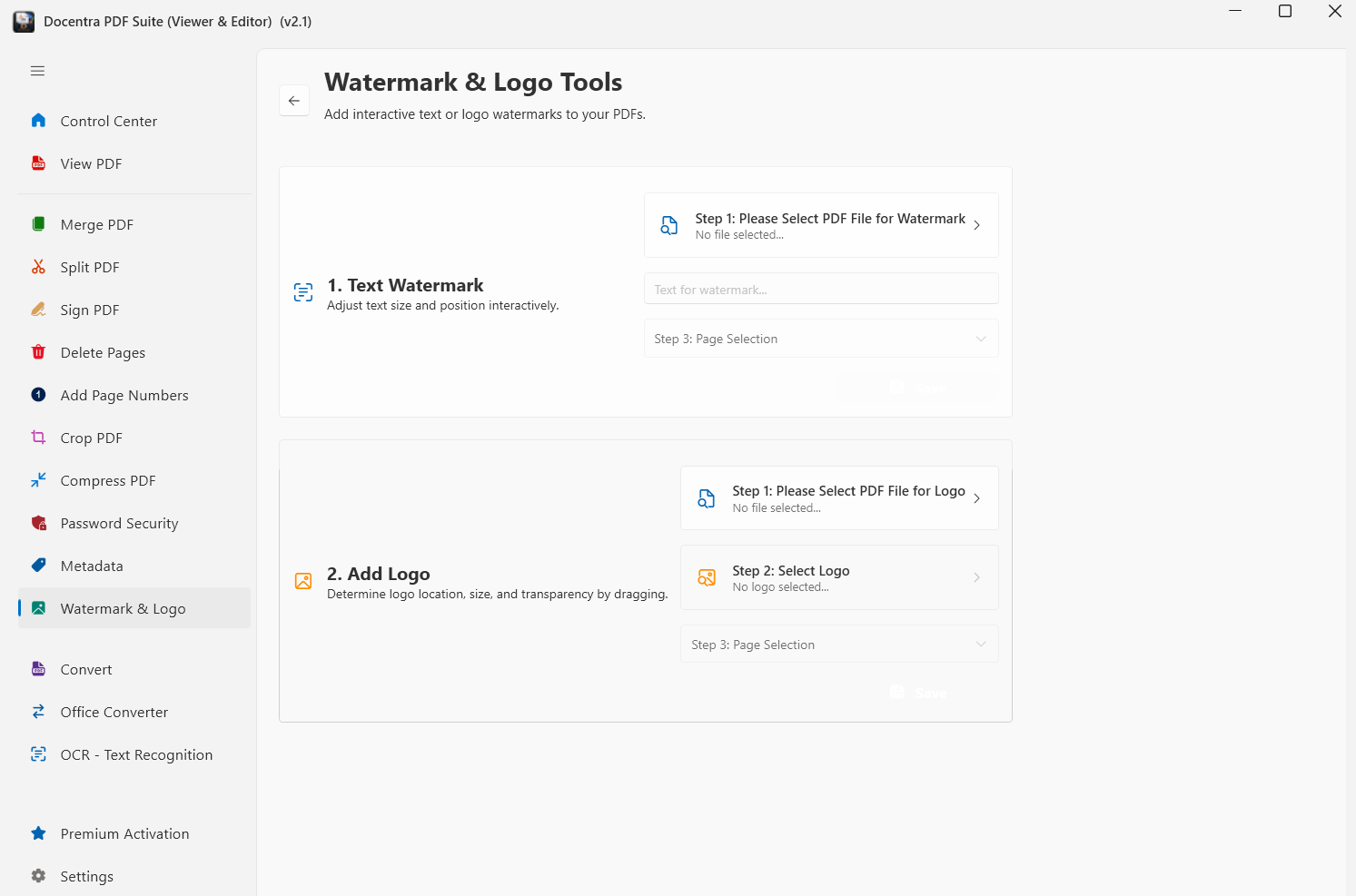
Open Docentra PDF Suite on your Windows machine and select the Watermark & Logo module from the main dashboard.
Step 2: Choose Text or Company Logo
• Text Watermark: Type your warning text (e.g., CONFIDENTIAL, DO NOT DISTRIBUTE, SAMPLE). Select your font, color, and size.
• Logo Stamp: Upload your corporate logo (PNG, JPG, SVG) with transparent background support to brand commercial proposals.
Step 3: Fine-Tune Opacity, Angle, and Position
Avoid obscuring critical numbers or legal text. Use Docentra's granular opacity slider (recommended: 18% to 25%) and rotate the watermark diagonally (45 degrees) across the center of every page.
Step 4: Batch Process in Milliseconds
Whether watermarking a 10-page pitch deck or a 600-page scanned architectural package, click Apply. Processing completes locally at lightning native speeds with zero upload queues or bandwidth throttling.
Feature Comparison: Offline Native vs. Cloud Watermark Tools
Frequently Asked Questions (FAQ)
Why is it risky to watermark confidential PDFs using free online tools?
Online PDF watermarking websites require uploading your entire document to remote servers. When watermarking an unreleased pitch deck, financial audit, or trade secret, transmitting it across the public web creates severe data leakage, compliance, and IP exposure risks.
Can I watermark multiple PDF files in batch completely offline?
Yes. Docentra PDF Suite allows you to batch watermark hundreds of pages and multiple documents simultaneously using your local multi-core CPU, with zero internet connection required.
How do I make sure the watermark doesn't obscure readable contract text?
Docentra provides granular opacity controls (e.g., 18% to 25% transparency) and diagonal rotation angles, ensuring the watermark remains clearly visible for leak deterrence without compromising readability.
Does watermarking a PDF prevent someone from copying the text?
Visual watermarking deters unauthorized distribution and screenshots. To completely prevent text extraction or printing, combine watermarking with Docentra's offline AES-256 permission encryption.
Related Privacy & Security Guides
Protect Your Intellectual Property Today
Stop uploading confidential contracts, financial models, and pitch decks to web converters. Get the 100% offline All-in-One PDF Suite for Windows.